Thinking of buying an AI Video Generation Course? In this CourseDekhlo review, we take an in-depth look at the Tutedude AI Video Generation Course (₹699) to help you decide.
Discover what the course actually covers, including AI video creation, AI filmmaking, text-to-video tools, AI avatars, video editing workflows, and practical projects.
We also examine the course modules, instructor’s teaching approach, learning experience, pros and cons, refund conditions, and overall value for money.
Read on to find out whether this course matches your learning goals and expectations.
CourseDekhlo objective is not to promote or discourage any particular course. It is to share an independent learner’s perspective so that you can make a more informed decision before spending your money.
That’s exactly why we built CourseDekhlo — to help fill this gap.
With CourseDekhlo, you can check whether a course or workshop is “Worth It,” “Maybe,” or “Skip.” CourseDekhlo documents what learners actually get from courses and workshops—the topics covered, depth, practical value, support, pricing, and overall learning experience—so readers can make their own informed decision before spending their time, money, and energy.
You can also use the CourseDekhlo Free Comparison Tool to compare courses and make a clearer decision.
Quick Verdict
Tutedude AI Video Generation Course — ₹699
Our Verdict: WORTH IT for beginners-to-intermediate ✅
- Price: ₹699
- Duration: Approximately 14+ hours (based on the enrolled course content we attended)
- Level: Basic-to-intermediate
- Best for: Beginners and early intermediate learners who want to explore AI video generation, experiment with different AI tools, and understand basic video creation workflows.
- Not suitable for: Advanced AI video creators and professional video editors looking for in-depth editing techniques, consistent character generation, advanced filmmaking, and detailed troubleshooting.
- Topics covered: AI video generation, prompt writing, image generation, voice generation, AI advertisements, character creation, storytelling, visual effects, and cinematic video workflows.
- Refund policy: Conditional 100% refund after completing all lectures, assignments, and projects according to the specified criteria and submitting the request within the applicable deadline.
- Rescheduling: Self-paced recorded lessons.
- Our experience: Personally purchased and attended the course; review based on actual course content and demonstrations.
For the full review, check below. 👇
About the Coach Behind Tutedude’s AI Video Generation Course
About Dr. Minhaj Abdullah:
Who He Is:
An academician, filmmaker, 3D animator, and VFX trainer with over 18 years of professional media experience. He serves as an Assistant Professor specializing in Media Tech, Generative AI, Animation, and AR/VR.
Education:
Ph.D. in Computer Science from LNCT Group of Colleges.
M.Sc. in Computer Science (Animation Specialization / VFX & Filmmaking) from Barkatullah University, Bhopal.
B.Sc. in Computer Science.
Industry Certifications:
Certified in Generative AI for Software Development (DeepLearning.AI), Design & Multimedia Content Creation (Adobe), and Unreal Engine / VR Foundations.
Career Background:
Over a decade of teaching and higher education experience across animation, media, and digital arts.
Produced creative media solutions for MNCs like P&G, Crompton Greaves, Eicher, and L&T.
Founder of the digital storytelling channel “Chai Stories,” with credits on over 200 short films and a web series streamed on platforms like SonyLIV, Hungama, and MX Player.
What He Does Today:
Assistant Professor at Mahindra University (School of Digital Media and Communication, Hyderabad), focusing on Generative AI and immersive media.
Active online tutor and professional consultant delivering global training in 3D animation, motion graphics, and visual effects.
Note: The information above has been compiled from publicly available sources, company profiles, professional platforms, interviews, and other online resources available at the time of writing.
Readers who wish to verify these credentials should refer to the instructor’s official professional profile, the relevant educational institutions, certification providers, award organizations, or other original sources.
CourseDekhlo does not guarantee the accuracy of third-party biographical claims that it has not independently verified.
About Tutedude AI Video Generation Course
| Details | Information |
| 💰 Course Fee | ₹699 |
| ⏰ Duration | Approximately 14+ hours |
| 💻 Format | Self-paced |
| 🖥️ Platform | Tutedude |
| 🎯 Level | Basic-to-intermediate |
Who Should Join the Tutedude AI Video Generation Course?
✅ This course is best suited for:
- Beginners who want to explore AI video generation through a Hindi-language course.
- Faceless YouTube creators and Instagram Reels creators interested in making AI-generated videos, ads, and avatar content.
- Video editors and content creators who want to explore AI tools such as Kling, ElevenLabs, HeyGen, etc., in their creative workflows.
- Aspiring AI filmmakers interested in experimenting with AI-generated scenes, short films, and storytelling projects.
❌ Who Should Skip:
- Experienced AI video creators who already know how to use tools such as Google Gemini, Flow, Hedra, and HeyGen to create AI videos.
- Advanced video editors looking for in-depth professional techniques, advanced post-production workflows, or highly specialized training, unless the course curriculum specifically covers those areas.
Tutedude AI Video Generation Course Modules
Based on our experience attending the course, here’s what was actually covered during the session:
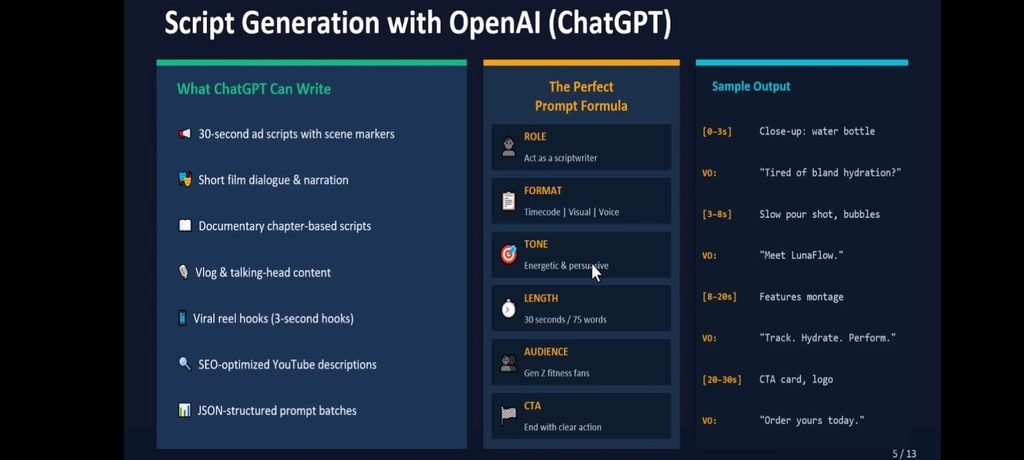
| Module 1: Introduction to AI Video Generation and Workflow Foundation The course begins with an introduction to the Tutedude platform and an explanation of how to use the course portal. After this introduction, the instructor, Dr. Minhaj Abdullah, introduces the fundamentals of AI video generation. In this module, the instructor covers: Introduction to generative AI for video production. Evolution of AI in video production. The basic AI video production pipeline. Script generation using ChatGPT. Voice generation using ElevenLabs. AI music generation using Suno AI. Image generation for visual storytelling. Introduction to AI video-generation tools such as Runway ML, HeyGen, and Veo 3. Basic prompting concepts and an introduction to JSON prompts. The instructor presents these topics as the foundation of an AI video production workflow, explaining how different AI tools can be combined to create video content. |
| Module 2: Basic Prompt-to-Video Generation and Shoe Advertisement This module moves from the introductory concepts to practical demonstrations of AI video generation. The instructor explains how to create prompts with the help of AI tools and use text prompts or images to generate videos. He demonstrates the process by creating a shoe advertisement-style video. He first generates a prompt using ChatGPT and then uses an AI video-generation tool to produce the video. This demonstration introduces the basic process of turning an idea into a prompt and using that prompt to generate an advertisement-style video. |
| Module 3: Meta AI Animation and Basic Car Advertisement Editing In this module, the instructor demonstrates animation generation using Meta AI and JSON prompts. He then downloads the generated video clips and uses video-editing software to combine the outputs into a basic car advertisement. The demonstration introduces a simple workflow involving AI-generated clips, downloading the outputs, and assembling them into a final video using editing software. |
| Module 4: Creating an AI Construction Video of Charminar This module demonstrates how AI can be used to create a construction-style video of the Charminar monument. The instructor first generates images of the monument and then uses AI video-generation tools to turn those images into video clips depicting the construction process. The demonstration introduces an image-to-video workflow in which generated images are used as visual references for creating a sequence of video scenes. |
| Module 5: AI Advertisement Creation Using Google Vids and Focal ML In this module, the instructor demonstrates different approaches to creating advertisement videos with AI. First, he uses AI to generate a prompt and then uses Google Vids to create an advertisement-style video. He subsequently demonstrates another workflow using Focal ML, again generating a prompt with AI and using it to create a video. These lessons introduce learners to multiple tools for generating advertisement content through AI-assisted prompting and video creation. |
| Module 6: AI Visual Effects, Gemini, ChatGPT, and NotebookLM This module covers additional AI-assisted approaches to visual content creation. The instructor uses his own image with Gemini and ChatGPT to create a visual-effects-style video. He also demonstrates NotebookLM for generating video content and creating a graphic novel. These examples introduce learners to AI-assisted visual effects, video creation, and alternative forms of visual storytelling. |
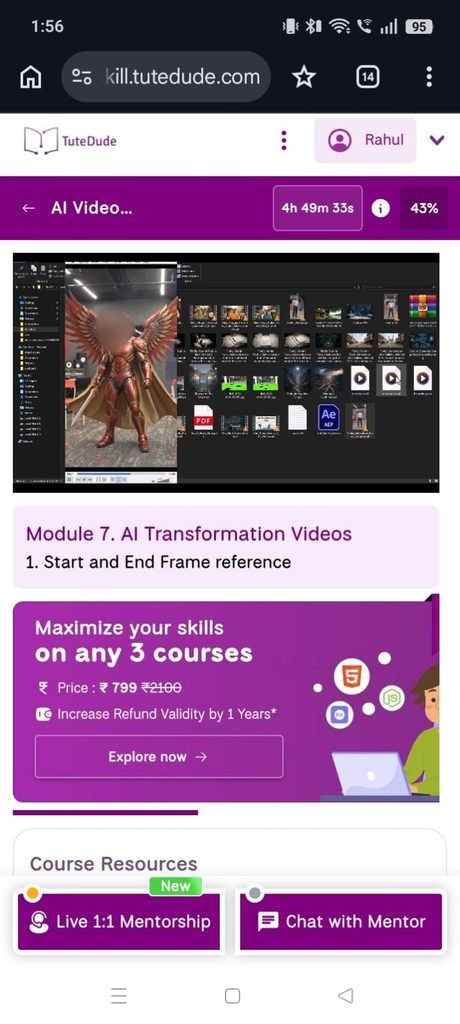
| Module 7: Higgsfield AI, Claude, Seedance 2.0, and AI-Generated Commercials In this module, the instructor introduces Higgsfield AI for image and video generation, using Claude to help create prompts. He first uses his own face to create a model or character and then uses Seedance 2.0 to generate a cinematic short video. The instructor also demonstrates the creation of: A UGC-style perfume advertisement. A Samsung mobile phone commercial. Cinematic video content using AI-generated characters and prompts. These demonstrations introduce learners to AI-generated characters, cinematic video creation, and commercial content production. |
| Module 8: Higgsfield Cinema Studio, AI Cast, and Character-Based Storytelling This module focuses on creating characters and using them in AI-generated storytelling. The instructor demonstrates Higgsfield Cinema Studio and its character-creation features. He uses AI Cast to create the required characters before generating the video. One example is a story featuring a son experiencing depression and his mother guiding and supporting him through mental health difficulties. The demonstration explores how AI-generated characters can be used to create a narrative video rather than simply generating isolated advertisement clips. |
| Module 9: Higgsfield AI Marketing Studio and UGC-Style Advertisements In this module, the instructor demonstrates additional content-creation features within Higgsfield AI, including its marketing studio. He shows how AI tools can be used to create UGC-style advertisements and marketing content. The course also includes commercial-video demonstrations across its practical lessons. In my experience, some of these demonstrations felt repetitive because similar advertisement-creation workflows had already been shown earlier. |
| Module 10: Cinematic AI Video Creation Using Higgsfield and Seedance 2.0 This module explores cinematic video creation using Higgsfield AI and Seedance 2.0. The instructor demonstrates how AI-generated characters, prompts, and video-generation tools can be combined to create short cinematic sequences. He also demonstrates commercial-style content, including a perfume advertisement and a Samsung mobile phone commercial, using Higgsfield AI and Seedance 2.0. I found this module interesting because it explores cinematic video generation and character-based content beyond basic text-to-video demonstrations. |
| Module 11: Video Creation Using Google Vids, Gemini Avatars, and Google Flow The final module covers additional workflows for creating videos with Google’s AI tools. First, the instructor uses Google Vids to create content featuring a character. He provides a prompt and uses an image as part of the video-generation process. He then demonstrates Gemini’s avatar-creation feature, using it to create his own avatar before generating a video. During this demonstration, I observed several mistakes in the generated output that were not adequately corrected. Finally, the instructor demonstrates Google Flow, creating a character and audio before generating the video. This module introduces learners to avatar-based video creation, AI-assisted content generation, and character-and-audio workflows using Google’s tools. |
| Topic | Covered? | Depth |
|---|---|---|
| AI Video Generation Basics | ✅ | ⭐⭐⭐⭐ |
| AI Prompt Writing (ChatGPT) | ✅ | ⭐⭐ |
| Text-to-Video Generation | ✅ | ⭐⭐⭐ |
| Image-to-Video Generation | ✅ | ⭐⭐⭐ |
| AI Image Generation | ✅ | ⭐⭐ |
| AI Voice Generation (ElevenLabs) | ✅ | ⭐⭐ |
| AI Music Generation (Suno AI) | ✅ | ⭐⭐ |
| AI Video Tools & Workflows | ✅ | ⭐⭐⭐⭐ |
| AI Advertisement Creation | ✅ | ⭐⭐⭐ |
| AI Character Creation | ✅ | ⭐⭐⭐ |
| Character Consistency | ✅ | ⭐ |
| AI Storytelling & Short Films | ✅ | ⭐⭐ |
| AI Visual Effects (After Effects) | ✅ | ⭐⭐ |
| AI Avatar & UGC Video Creation | ✅ | ⭐⭐ |
| Cinematic AI Video (Higgsfield & Seedance 2.0) | ✅ | ⭐⭐⭐⭐ |
| Professional Video Editing | ✅ | ⭐ |
| Advanced AI Video Troubleshooting | ❌ | — |
👉 Overall: The course covers multiple AI tools, prompt writing, image and video generation, voiceovers, music, advertisements, character creation, AI storytelling, visual effects, and basic video-editing workflows. It provides a broad, practical introduction, but advanced editing, character consistency, and troubleshooting receive limited depth.
My Personal Experience with the Tutedude AI Video Generation Course
This course can be helpful for beginners and intermediate learners who want to explore AI video creation. The coach introduces various AI tools and demonstrates how to create videos using AI-generated prompts, images, voices, and characters. He also explains different workflows and tools for creating different types of videos.
However, I noticed some limitations during my learning experience.
- Character Consistency: In some demonstrations, AI-generated characters did not maintain exactly the same visual appearance across different scenes. I would have appreciated more detailed guidance on maintaining character consistency.
- Correction of AI-Generated Errors: Some generated outputs contained visual inconsistencies or imperfections. More detailed demonstrations of how to identify and correct these issues would have made the lessons more useful.
- Depth of Explanation: Several tools and workflows are introduced through demonstrations. However, I felt that some topics could have benefited from deeper explanations and additional hands-on exercises.
- Practical Troubleshooting: More step-by-step troubleshooting examples would help learners understand what to do when an AI tool produces an unexpected result.
These are my personal observations from the version I attended. They do not necessarily represent every learner’s experience.
My verdict: Based on my experience, this course is useful for understanding the basics of AI video generation and exploring different tools, but it may not be sufficient for learners who want in-depth training in professional AI video creation and editing.
Pros & Cons of Tutedude AI Video Generation Course
| ✅Pros: | ⚠️ Cons: |
| Explores multiple AI tools: Introduces different tools for creating AI-generated videos, images, voices, and characters. | Limited depth: Most lessons focus on basic demonstrations rather than detailed, advanced training. |
| Demonstrates basic workflows: Shows how to use AI-generated prompts and images to create videos. | Character consistency issues: The coach’s demonstrations do not consistently maintain the same character across video scenes. |
| Useful for beginners: Helps learners understand the fundamentals of AI video generation. | Limited troubleshooting: Some AI-generated mistakes are shown without being adequately corrected. |
| Prompt improvement tip: Demonstrates how to correct unwanted JSON-formatted responses from ChatGPT by improving the prompt, potentially saving AI credits. | Basic editing instruction: The course focuses more on generating clips and assembling videos than teaching professional video editing in depth. |
| Visual effects demonstration: Uses After Effects to show a child jumping across blocks near a ditch. | Repetitive content: Module 9 revisits commercial-video creation, which may feel repetitive. |
| Interesting cinematic project: Module 10 demonstrates cinematic video creation using Higgsfield AI and Seedance 2.0. |
FAQs of Tutedude AI Video Generation Course
Tutedude AI Video Generation Course review?
Based on CourseDekhlo experience, the course introduces several AI tools and basic to intermediate video-generation workflows. It is useful for beginners, but has limitations in character consistency, detailed editing, and troubleshooting AI-generated mistakes.
Is Tutedude worth it?
It may be worth considering if you are a beginner who wants to explore different AI video tools. However, if you expect advanced AI filmmaking, professional editing, and detailed practical training, you may find it basic.
Is the Tutedude AI Video Generation Course suitable for beginners?
Yes. The course starts with basic AI video-generation concepts and demonstrates how to use different AI tools to create images, voices, characters, and videos.
Which AI tools are covered in the Tutedude AI Video Generation Course?
The demonstrations include tools such as ChatGPT, Gemini, HeyGen, Kling, Suno, ElevenLabs, Google Vids, Google Flow, PixVerse, Higgsfield AI, and Seedance 2.0.
Does the Tutedude AI Video Generation Course teach professional video editing and character consistency?
Based on CourseDekhlo experience, not in sufficient depth. The course demonstrates basic to intermediate video creation and editing workflows, but character consistency, advanced editing, and troubleshooting need more detailed instruction.
Tutedude AI Video Generation Course Refund Policy
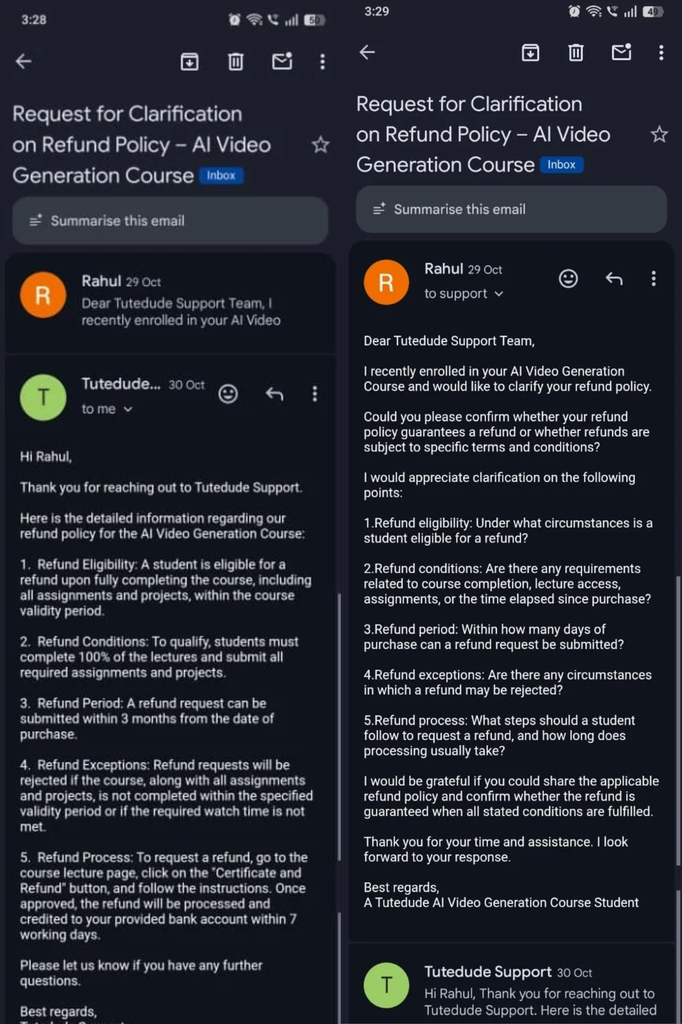
According to the refund policy clarification received directly from Tutedude Support:
- 100% Course Completion: Students must complete all lectures (100%) within the course validity period.
- Assignments & Projects: All required assignments and projects must be submitted and completed according to Tutedude’s specified criteria.
- Refund Eligibility: A refund is available only after fulfilling the course completion and assignment requirements.
- Refund Deadline: The refund request must be submitted within 3 months of the purchase date.
- Refund Processing: Once approved, the refund is processed within 7 working days.
Note: This section reflects our personal experience and the information available to us at the time of writing. Policies and support responses may change, so we recommend confirming the latest refund, rescheduling, and recording terms directly with Tutedude before making a purchase.
CourseDekhlo Final Verdict: Tutedude AI Video Generation Course
The Tutedude AI Video Generation Course is a useful starting point for beginners and intermediate learners who want to explore different AI tools and understand basic AI video creation workflows. The coach introduces several tools and demonstrates how to generate images, voiceovers, characters, and videos using AI.
However, the course has limitations in practical depth. Character consistency, professional video editing, and troubleshooting AI-generated mistakes are not covered sufficiently in the demonstrations. Some lessons also feel repetitive.
Our verdict: Consider this course if you want a basic to intermediate introduction to AI video-generation tools and workflows. However, if your goal is to master professional AI video creation, advanced editing, and consistent character-based storytelling, this course may not meet your expectations.
Before enrolling, also review the refund conditions carefully: a refund is subject to completing 100% of the lectures and all required assignments and projects within the specified period.
CourseDekhlo Rating: 4.1/5
Not sure this course is right for you?
Compare this course with other AI and AI Video Generation courses using CourseDekhlo’s free Compare Courses Tool to find the right fit for your goals and budget.
| ✅ Compare Other AI Courses |
How CourseDekhlo Reviewed This Course
We don’t review this course only from it’s sales page.
For this review, we:
✅ Attended the course
✅ Observed the actual topics demonstrated
✅ Evaluated the depth of teaching
✅ Compared the course price with what was delivered
✅ Checked the suitability for beginners vs experienced learners
✅ Contacted support regarding refund/rescheduling/recording questions
Review based on our actual attendance date.
Last Update: November 2026
Free Alternatives to Tutedude AI Video Generation Course
🎁 Exclusive Bonuses for CourseDekhlo Readers
What this guide is for
Use this free CourseDekhlo resource to turn AI video-generation knowledge into practical results — learn how to plan your videos, write better prompts, use AI tools effectively, and save your generation credits.
🎁 Gemini & ChatGPT AI content creation tips
🎁 Practical AI video prompting guide
🎁 Tips to plan videos before generating them
🎁 Character consistency and video quality tips
🎁 How to reduce AI-generated mistakes and unnecessary retries
🎁 Gemini video aspect ratio guide (9:16, 16:9 and more)
🎁 Ready-to-use AI video prompt template
🎁 Practical tips to review, improve and refine AI-generated videos
⚠️ Independent Review and Transparency Disclosure
This is an independent review based on my personal experience with Tutedude’s AI Video Generation Course.
I personally purchased and accessed the course before writing this review. The observations, opinions, strengths, limitations, and rating reflect my own learning experience.
- CourseDekhlo received no payment or sponsorship from Tutedude or the instructor for publishing this review.
- This review was not written in exchange for any promotional benefit.
- This article contains no affiliate links to the reviewed course.
- Course details, pricing, curriculum, tools, and refund conditions may change. Readers should verify the latest information with Tutedude before purchasing.
CourseDekhlo aims to provide independent, experience-based course reviews to help learners make informed decisions.
At CourseDekhlo, we always focus on delivering value, clarity, and trust to our readers.
Trademark and Affiliation Disclaimer
CourseDekhlo is an independent course review and discovery platform. It is not affiliated with, sponsored by, or officially endorsed by Tutedude, the instructor, or any third-party companies and tools mentioned in this article.
Names such as Tutedude, Google, Gemini, ChatGPT, OpenAI, ElevenLabs, Suno, Runway, HeyGen, Higgsfield, and other product or company names are mentioned solely for identification, educational, informational, and review purposes.
All trademarks, brand names, and product names belong to their respective owners. Their mention does not imply any partnership, sponsorship, approval, or endorsement.
Important Note About the Course Version Reviewed
This review is based on the version of Tutedude’s AI Video Generation Course that I personally purchased and accessed.
Course content, lesson structure, tools, duration, pricing, and features may change over time. The version available when I enrolled may therefore differ from the course currently listed on Tutedude’s official website.
The modules, lessons, examples, and observations discussed below reflect my actual learning experience with the version I attended. They should not be interpreted as a guarantee that every lesson or feature remains part of the current offering.
For the latest course details, pricing, features, and refund conditions, please check Tutedude’s official course page before enrolling.
💬 Have you purchased or attended Tutedude’s AI Video Generation Course?
I would welcome your experience, including what you found useful, what could be improved, and whether your course version differs from the one discussed in this review.
Please share factual and respectful feedback in the comments. Your experience may help other learners make more informed decisions.
✅ Drop your thoughts in the comments below — your experience could help thousands of other learners make smarter choices.
Let’s build a smarter learning community together.